Filtered YouTube for Jewish Families: What Works, What Leaks, and How to Choose
Filtered YouTube means YouTube's videos with something deciding what can play. There are two kinds. YouTube's own settings (Restricted Mode, supervised accounts, YouTube Kids) start from all of YouTube and hide part of it, and YouTube itself says "No filter is 100% accurate." An approved library starts from nothing and shows only videos approved first. Choose by who is watching, on which device, and who holds the key.

What "filtered YouTube" means
People type "filtered YouTube" and "kosher YouTube" for the same reason. The videos on YouTube are often wonderful: a shiur from a rav they follow, a niggun for Shabbos, a story for a child at bedtime. What worries them is everything around the video: the feed that picks what comes next, the search box that will answer anything, the comments, the short clips that never end.
So "filtered YouTube" does not mean one product. It means any arrangement where something stands between a person and the whole of YouTube and decides what can play. That something can be a switch inside YouTube, an account a parent controls, a separate app, or a separate library of approved videos. They are not the same, and they do not fail the same way.
This guide walks through each one using YouTube's own words for its own settings, pictures we took of the real screens on 1 October 2026, and LeHallel's own numbers for its library. One of the options described is LeHallel. The comparison is honest anyway, and it says plainly where LeHallel is not the answer.
The two kinds, and which way each one fails
Every way of filtering YouTube belongs to one of two families. Knowing which family you are in tells you how it will let you down.
Hide some. YouTube's own Restricted Mode, its supervised accounts and its YouTube Kids app start from YouTube's catalog and narrow it. When they miss, something a family did not want reaches the screen. YouTube is open about this. The Restricted Mode panel we opened on 1 October 2026 says, in YouTube's own words: "This helps hide potentially mature videos. No filter is 100% accurate."
Approve first. A separate library starts empty and adds only what was approved. Its usual miss is quiet: a good shiur or song is not there yet. Its cost is the other side of the same coin: it will always hold less than YouTube. And an approval, like any judgment, can be wrong: something can be approved that a family would not have chosen. So whichever kind you use, know how to report a video that should not be there (for LeHallel: team@lehallel.com or 718-971-4311).
YouTube's own settings, as YouTube describes them
YouTube offers three family tools. Here is what each one does, in YouTube's own words, so you can judge it yourself. Our guide YouTube for parents goes further, with pictures of YouTube's own menu and Restricted Mode panel, a plan by age, and YouTube's own steps for blocking a channel and limiting Shorts.
Restricted Mode (free, inside YouTube)
YouTube's help page calls it "an optional setting that you can use on YouTube" that "can help screen out potentially mature content that you or others using your devices may prefer not to view." It also says how it decides: "We use many signals, like video title, description, metadata, Community Guidelines reviews, and age restrictions to identify and filter out potentially mature content." Two lines on the same page matter most for a family. First: "When Restricted Mode is turned on, you can't view comments on the videos you watch." Second: "Restricted Mode works on the browser or device level, so you must turn it on for each browser you use." The panel itself repeats it: "This setting only applies to this browser."
Supervised accounts (free, through a parent's Google account)
For a child under 13, YouTube's setup page says a parent "can set up a supervised kid account," choosing a content setting "that limits the videos and music their child has access to." Those settings, YouTube writes on its comparison page, "generally align with content ratings for viewers ages 9+, 13+, or 16+." For older children the picture changes: "There aren't content settings for teens. Teens can explore all of YouTube, except age-restricted content." Parents of teens can use YouTube's Family Center to "manage screen time limits for your child, including setting a Shorts feed limit."
YouTube Kids (a separate app)
YouTube Kids is a smaller app with three age settings: "Preschool (ages 4 and under) Younger (ages 5–8) Older (ages 9–12)." YouTube adds that parents "can also define profiles for their kids' viewing to handpick the videos they have access to." Handpicking is the closest YouTube itself comes to approve-first, and it puts the whole job of choosing on the parent.
What YouTube's settings leave open
None of this makes YouTube's tools useless. They are free, they are built in, and for many families they are a sensible first layer. But a family that calls them "filtered YouTube" should know what they do not touch:
- Every other browser and device. Restricted Mode lives in one browser. A second browser, a second profile, or a friend's tablet starts fresh.
- The feed and the next video. The settings narrow which videos can appear, but YouTube still decides what to suggest next from what remains.
- Teenagers. In YouTube's own words, there are no content settings for teens.
- The judgment itself. What counts as "mature" is YouTube's call, made for the whole world, not for a Torah home. A video can pass every YouTube setting and still be something your family would not choose.
Teenagers are not a small group here. Pew Research Center's survey of U.S. teens ages 13 to 17, taken in September and October 2024, found that "Nine-in-ten teens report using the site," and that "73% of teens say they go on YouTube daily," including "15% who describe their use as 'almost constant.'"
An approved library: what we saw on LeHallel
An approved library is not YouTube with a switch turned on. It is a separate place that holds only videos that were approved before they appear, and plays them there. LeHallel is one, built for Jewish families. On 1 October 2026 we opened lehallel.com in a real browser at iPhone size and wrote down what a visitor sees, with nothing signed in.

Here is what that visit showed, in order:
- The first screen is a home screen, not a feed. It opens on a Today card with the day's Hebrew date, shkia, the daf and the parsha (that day: 20 Tishrei 5787, shkia 6:37 PM in Brooklyn, Bechoros 13, Shmini Atzeret), then rooms: Parsha, Daf Yomi, Live, Music, Halacha, Zmanim, Filtered WhatsApp and Kids. Along the bottom: Home, Shiurim, Search, Sefarim and Me.
- The count is on the first screen. The phone home screen showed 428,480 pre-approved videos. The Shiurim tab showed the same number, and that 16 had come in that day.
- Nothing asks you to sign in. The Me tab says it plainly: "one free account for every device · videos play without one."
- No comment sections. None of the rooms we opened has a place for comments.
- Search answers only with approved videos. When a search reaches something LeHallel has never reviewed, LeHallel's own explainer says it shows a checking state while "candidate material" is "weighed against the written policy before any of it may appear."
Two honest notes from the same visit. The home screen carries a line inviting a sponsor ("Today's sponsor · your message here"); LeHallel's FAQ says it does not sell ad space or inject sponsorships, but every video plays through YouTube's official player, where "YouTube may show its own ad on some of those videos." And a video page can go on to another video by the same speaker; what plays next comes from the same approved library, never from YouTube's feed.
Who approves the videos
People ask this first, and they should. LeHallel publishes the outcome, not the method. Its FAQ says every video "is reviewed against one written standard before it can appear," that there are "only three answers: open, hidden, or closed," and that "doubt means it stays hidden." It does not publish the standard's full text, or whether a person, software or both reviewed a given video. That standard is LeHallel's own. It is not a hechsher and not a psak. If your family follows a specific rav or community standard on video, ask your rav whether a library like this fits it, and look inside it yourself before you rely on it.
What is inside the library, in numbers
A library is only as useful as what it holds. LeHallel's own catalog counts for 1 October 2026 break the approved videos down by subject. One video can sit under more than one subject, and the largest bar is the honest one: most approved videos are not yet sorted under any subject. They are approved and they play; they simply have not been placed on a subject shelf.
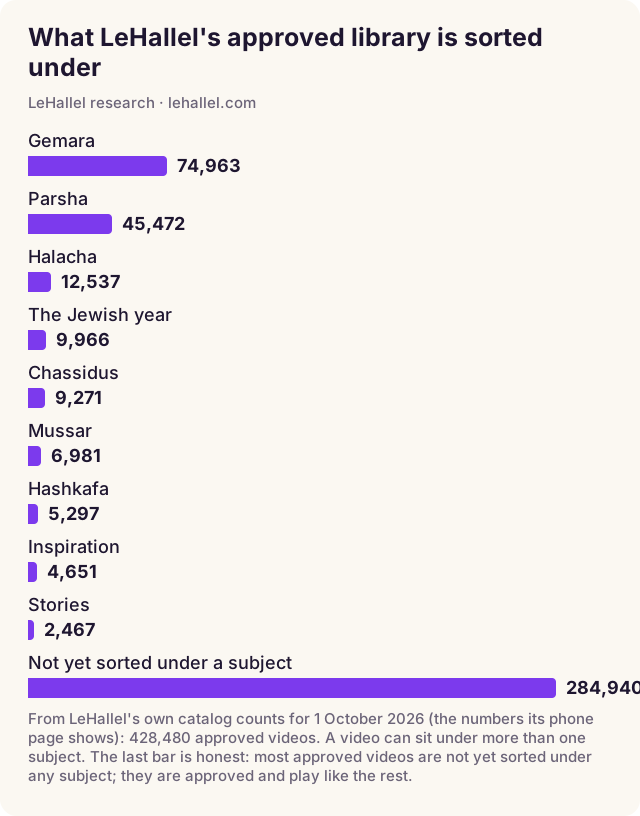
Read the chart the way a family would. Gemara and parsha are the deepest shelves, which matters if your filtered YouTube is mostly for learning. Music has its own room and its own count of songs (see our music guide). The Kids room held 1,757 videos that day (see our kids guide). If what your family watches is mostly something else, look for it before you decide.
How to choose: a table by who is watching
The right answer depends far more on the person than on the product. Start from the row that describes who will be watching.
| Who is watching | A sensible start | What it does not cover | Add or check |
|---|---|---|---|
| A young child, with you nearby | An approved kids room, or YouTube Kids with handpicked videos | Anything else on the device | Watch the first few together; keep the device where you can see it |
| A child under 13 on their own device | An approved library for what they watch; a supervised account if YouTube stays | Other browsers and apps on that device | Who can change the settings, and on which devices |
| A teenager | An approved library for learning and music | YouTube itself, which has no content settings for teens | A conversation, and whatever the phone itself allows |
| An adult who wants shiurim without the feed | An approved library opened directly | The open web, if the phone has it | Bookmark the library, not YouTube |
| A classroom or shul screen | An approved library on the one screen | The rest of the building's devices | Test the exact videos before the class |
One line runs through every row: an approved library decides what plays inside it. It does not decide what else the device can open. That is a separate job, for the phone or the network, and no video library does it.
Seven checks before you call it filtered
Whatever you choose, run these seven checks on the real device, signed in as the person who will use it. They take ten minutes and they catch most surprises.
- Which browsers and apps? List every way this device can play a video. A setting in one browser does nothing in another.
- Who can switch it off? If the person watching can turn it off, assume it will be off on a hard day.
- What does search return? Type a few ordinary words a child might type. See what comes back, and from where.
- What plays next? Let one video finish. Does the next one come from your chosen source or from a feed?
- Are there comments? Open a video and scroll down.
- What about short clips? Check whether an endless short-video feed is one tap away.
- Is what you need actually there? Search for the three speakers, songs or shows your family really uses. A library that does not hold them will not be used.
Questions people ask
What is filtered YouTube?
YouTube's videos with something deciding what can play. Either YouTube's own settings hide part of YouTube, or a separate approved library shows only videos approved first. The first can let something through; the second can leave something out.
Is there a kosher YouTube?
Not from YouTube itself. YouTube's settings judge by YouTube's idea of "mature", made for everyone. Families who want a Jewish standard use an approved library built for it, and ask their rav what fits their home.
Does YouTube Restricted Mode make YouTube safe?
It helps, and YouTube says it is not complete: "No filter is 100% accurate." It works one browser at a time and hides comments while it is on.
Is YouTube Kids enough?
For young children it narrows a lot, especially if a parent handpicks the videos. It is not made for older children or adults, and its idea of suitable is YouTube's, not a Torah home's.
Can teenagers get filtered YouTube?
Not inside YouTube's own content settings: YouTube says "There aren't content settings for teens." An approved library works the same for every age.
Is LeHallel free?
Yes. Videos play without an account, and LeHallel's FAQ says "No card is taken anywhere on this site." YouTube's player, which plays every video, may show YouTube's own ad on some.
Who decides what is approved on LeHallel?
LeHallel reviews every video against one written standard, the same for everyone, before it appears; it does not publish the standard's text or who reviews each video. It is LeHallel's standard, not a hechsher; ask your rav what fits your home.
Does LeHallel block YouTube on my phone?
No. LeHallel is a library, not a filter for the phone. What else a device can open is decided on the device itself.
Sources
- YouTube Help, Turn Restricted Mode on or off on YouTube (read 1 October 2026): "an optional setting", comments hidden, "you must turn it on for each browser you use".
- YouTube, the Restricted Mode panel on youtube.com, signed out, opened 1 October 2026 (picture in YouTube for parents): "This helps hide potentially mature videos. No filter is 100% accurate. This setting only applies to this browser."
- YouTube Help, Set up supervised kid accounts (read 1 October 2026).
- YouTube Help, YouTube Kids, supervised accounts and teens compared (read 1 October 2026): the age settings, "There aren't content settings for teens", the Shorts feed limit.
- Pew Research Center, Teens, Social Media and Technology 2024 (December 12, 2024): U.S. teens ages 13 to 17, surveyed September 18 to October 10, 2024.
- Google, Family Link (read 1 October 2026).
- LeHallel, the phone home screen and the Shiurim and Me tabs, opened in a real browser at iPhone size on 1 October 2026 (the pictures above).
- LeHallel's own catalog counts for 1 October 2026: approved videos by subject (the chart above).
- LeHallel, FAQ (read 1 October 2026): "No card is taken anywhere on this site"; every video "plays through YouTube's official player"; "YouTube may show its own ad on some of those videos."
- LeHallel, Why a first-of-its-kind search takes longer (read 1 October 2026).