YouTube for Parents: Shorts, Restricted Mode and YouTube Kids, Honestly
YouTube gives parents three tools. Restricted Mode works one browser at a time, and YouTube's own panel says "No filter is 100% accurate." Supervised accounts for children under 13 offer content settings for ages 9+, 13+ or 16+. YouTube Kids has three age settings, or videos a parent handpicks. For teens there are no content settings, only time limits such as a Shorts feed limit. None of them chooses by a Torah home's standard.
What people type about a safer YouTube
We collected the searches Google and YouTube suggest when people start typing "youtube filter", "safe youtube" and "filtered youtube": 703 different searches, on 30 September 2026. Most were about other things (photo filters, water filters, download tools). The ones about making YouTube safer fall into a few clear worries.
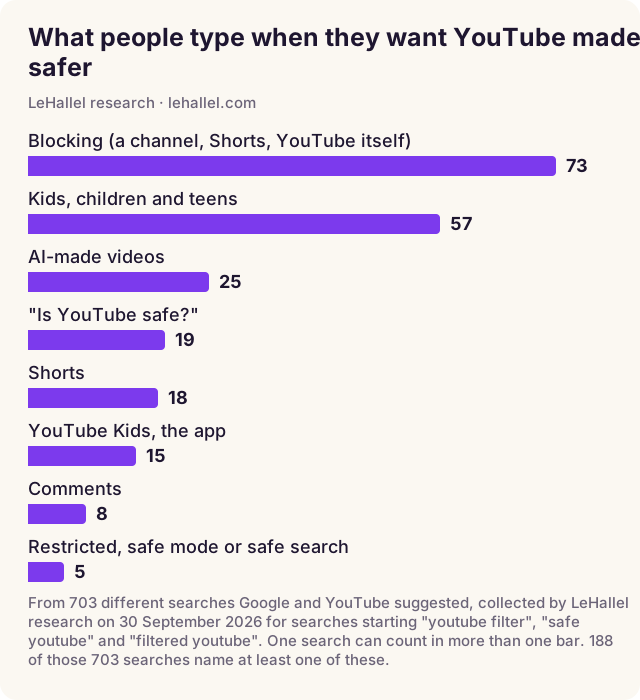
Read the chart for what it is: a count of different searches Google and YouTube offer, not of how often each one is typed. Even so, the shape is clear. The most different ways of asking are about blocking: a channel, Shorts, or YouTube altogether. Then children and teens by age ("is youtube safe for 10 year olds" is a real suggestion, and so is 7, 11, 12 and 13). A newer worry has its own bar: videos made by AI. And "is YouTube safe?" comes up in many forms. This guide takes those questions in that order, using YouTube's own words for its own settings.
Where each YouTube setting lives
The single most useful thing to understand is that YouTube's settings do not all live in the same place. Each one covers its own layer, and nothing more.
Restricted Mode, opened and read
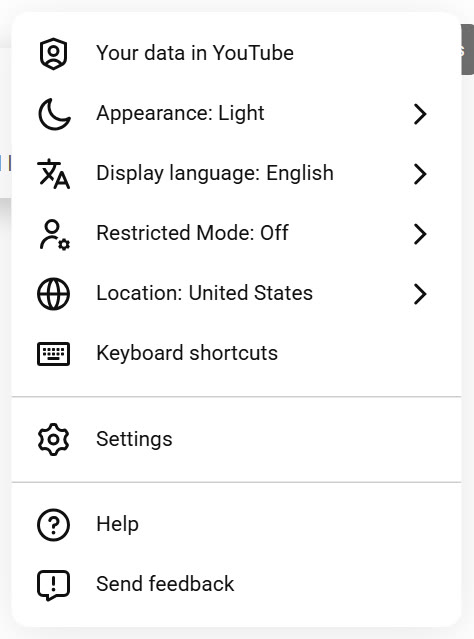
On 1 October 2026 we opened youtube.com in a fresh browser, signed out, and opened YouTube's own menu. Restricted Mode sits in the menu between the display language and location settings, and it was off. We opened the panel and read it; we did not turn it on and run searches, so this guide reports what YouTube says the setting does, not a test of how well it works.
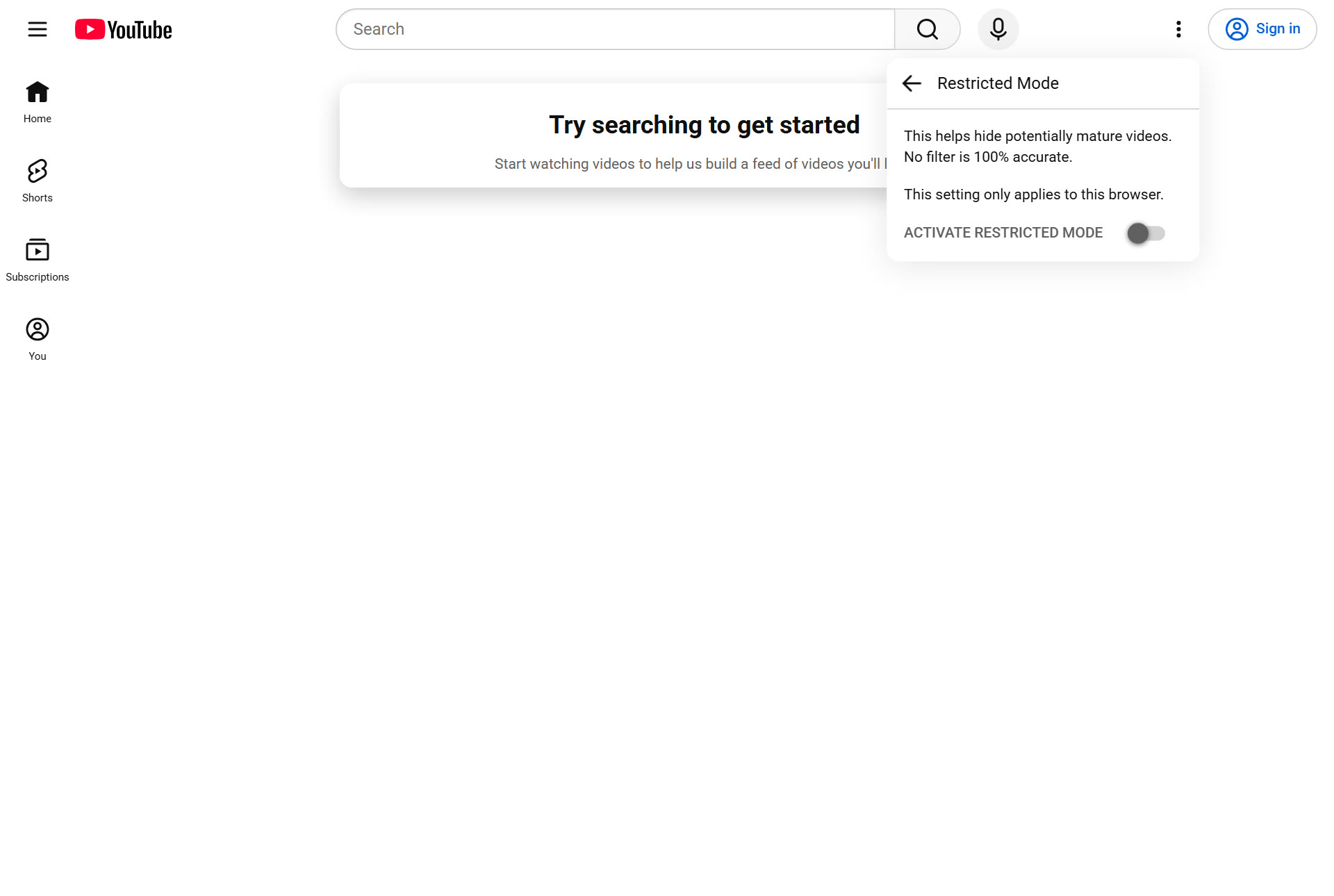
Pressing it opens the panel in the picture at the top of this guide. Three of YouTube's own sentences, from its help page, are what a parent needs to know:
- What it is: "an optional setting that you can use on YouTube. This feature can help screen out potentially mature content that you or others using your devices may prefer not to view."
- Comments: "When Restricted Mode is turned on, you can't view comments on the videos you watch."
- Where it works: "Restricted Mode works on the browser or device level, so you must turn it on for each browser you use."
The same help page explains how YouTube decides: "We use many signals, like video title, description, metadata, Community Guidelines reviews, and age restrictions to identify and filter out potentially mature content."
For some children a parent can lock the switch, with a condition worth reading closely: "If you're a parent using the Family Link app, you can turn on Restricted Mode for your child's account if they're not eligible for a supervised experience on YouTube." Then "your child can't change the Restricted Mode settings on any device they're signed in to." YouTube adds that you can't set it up for a child who is "over 13 (or the relevant age in your country/region), unless you created their supervised Google Account before they reached this age." Otherwise, in an ordinary browser, it is a switch anyone at that browser can turn back off.
Supervised accounts and YouTube Kids
For children under 13, YouTube offers two separate paths. Its help page compares them, and the differences are worth reading closely.
A supervised account on YouTube
YouTube writes that a parent who decides a child under 13 "is ready to explore YouTube can set up a supervised kid account," choosing "a content setting that limits the videos and music their child has access to." The settings "generally align with content ratings for viewers ages 9+, 13+, or 16+." It is still YouTube, with a narrower catalog.
YouTube Kids
YouTube Kids is a separate app, smaller still, with three age settings: "Preschool (ages 4 and under) Younger (ages 5–8) Older (ages 9–12)." There is also a fourth way, which is the closest YouTube comes to approving videos first: parents "can also define profiles for their kids' viewing to handpick the videos they have access to." Handpicking works well, and it puts the whole job of choosing on the parent.
Both are judged by YouTube's idea of what suits an age, made for families everywhere. A video can pass every one of these settings and still be something a Torah home would not choose, and a perfectly good shiur can be left out.
Blocking a channel, and limiting Shorts, in YouTube's own steps
Blocking is the biggest bar in the chart above, so here is what YouTube itself offers, in its own words.
- In YouTube Kids: "You can sign in to the YouTube Kids app to block channels and videos." A parent can also "sign in to YouTube using your linked parent account to: Block content from your child's YouTube Kids profile."
- The Shorts feed limit: YouTube's steps are "Sign in to the YouTube app. Tap on the You tab Settings. Tap Time management. Tap Shorts feed limit." The list of limits includes "the option to set your Shorts feed limit to zero." Read the last line before relying on it: when the limit is reached, "a message will appear reminding you. You will be prompted with an option to dismiss or ignore your set limit." On a teen's own account, the limit is a reminder, not a lock; for a supervised child, a parent sets it in Family Center.
Shorts
Shorts are YouTube's short vertical videos, played one after another as you swipe. In the picture at the top of this guide, Shorts has its own place in YouTube's left rail, even for a visitor who is not signed in. Many parents' first request is to make Shorts go away, and it shows in the searches: "youtube filter no shorts", "youtube filter out shorts", "youtube can block shorts".
What YouTube's help pages describe is a limit, not a switch: in YouTube's Family Center a parent can "manage screen time limits for your child, including setting a Shorts feed limit." The help pages we read on 1 October 2026 did not describe a setting that removes Shorts for everyone. If Shorts are the problem in your home, the honest answers are a time limit, a supervised account, or opening short videos from somewhere other than YouTube's feed.
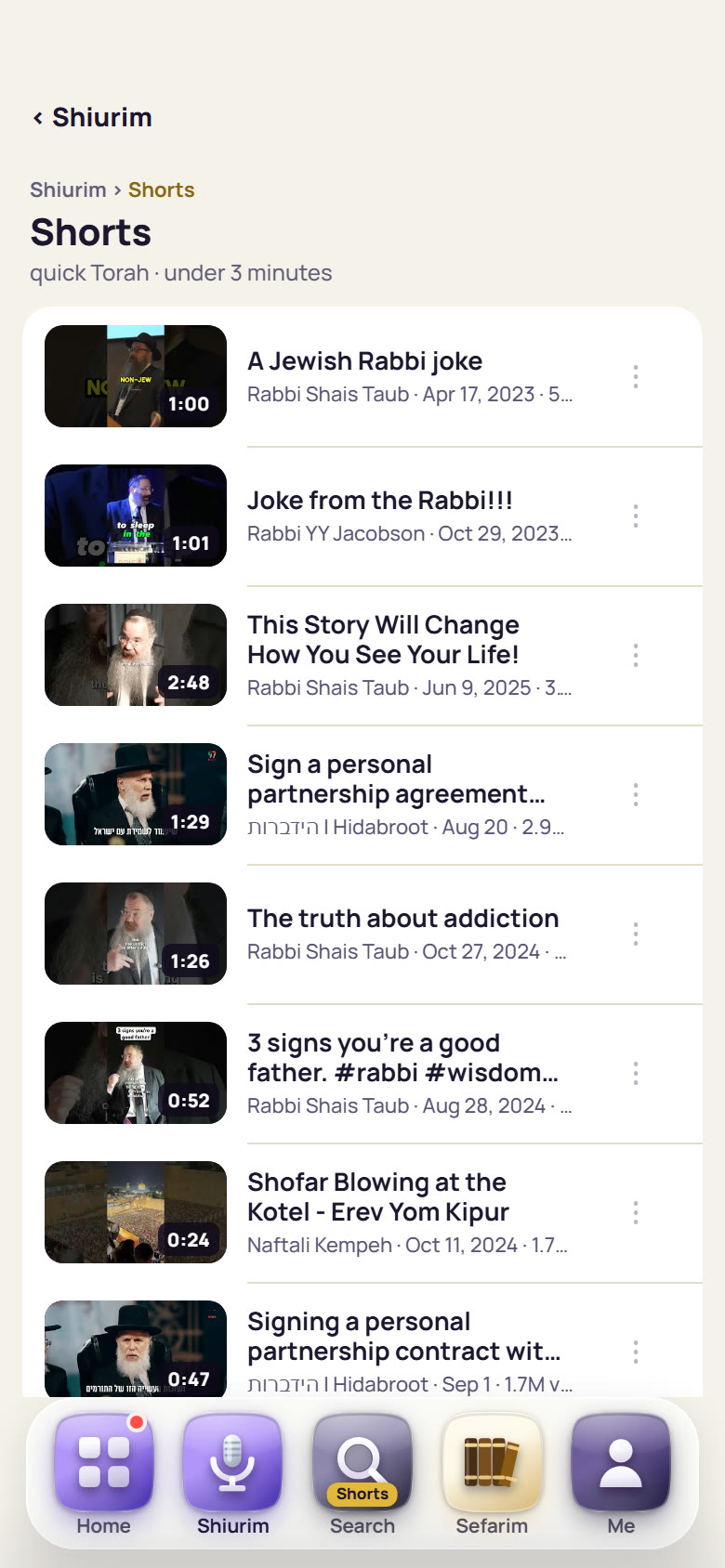
Short videos themselves are not the problem; an endless feed of them is. LeHallel, for example, keeps a Shorts shelf, "quick Torah · under 3 minutes": short clips from rabbis and Torah organizations, from stories to a joke to an appeal for donations, every one approved, laid out as a list rather than a feed.
Teenagers
This is where YouTube's tools thin out. In YouTube's own words: "There aren't content settings for teens. Teens can explore all of YouTube, except age-restricted content." A parent can still set time limits through Family Center, including the Shorts feed limit.
Teenagers are also where YouTube matters most. Pew Research Center's survey of U.S. teens ages 13 to 17, in September and October 2024, found that "Nine-in-ten teens report using the site," that "73% of teens say they go on YouTube daily," and that this "includes 15% who describe their use as 'almost constant.'"
For a teenager, settings are only part of the answer. The rest is a conversation about why, a phone set up so that the rules are not up to willpower alone, and places to go for the good parts (shiurim, music, a speaker they like) that do not come with the feed attached. Our guide to filtered YouTube covers that last part.
A plan by age
Start from your child's age and the device they use. Each row says what YouTube itself offers, what that leaves open, and what to add.
| Age | What YouTube offers | What it leaves open | What to add |
|---|---|---|---|
| 4 and under | YouTube Kids, Preschool, or handpicked videos | Anything outside the app on the same device | Watch together; keep the device in a shared room |
| 5 to 8 | YouTube Kids, Younger, or handpicked videos | YouTube's idea of "suitable" | Handpick, or use an approved kids room |
| 9 to 12 | YouTube Kids, Older; or a supervised account (9+ or 13+) | The feed and suggestions inside YouTube | An approved library for what they watch most |
| 13 and up | No content settings; time limits, including a Shorts feed limit | All of YouTube except age-restricted videos | A conversation, a phone set up to fit your rules, and good places to go instead |
| Any age, any browser | Restricted Mode | Every other browser, and anyone who turns it off | Family Link can lock it for some children under 13 (YouTube's conditions above) |
Fifteen minutes, one child's device
Here is a short list to work through on the actual device your child uses, with them beside you if they are old enough. It is about choosing well, not about locking down everything.
- List the ways it plays video. Browsers, the YouTube app, YouTube Kids, other apps. Each one is its own question.
- Decide the account. Signed out, a supervised account, or YouTube Kids. For under 13, supervision is what lets a parent's settings hold.
- Choose the content setting with your child's real age in mind, then look at what it shows for a few minutes before you trust it.
- Turn on Restricted Mode in each browser the child uses, and through Family Link where YouTube allows it (for a child under 13 who is not eligible for a supervised experience on YouTube).
- Set a time limit, and if Shorts are the issue, a Shorts feed limit.
- Bookmark the good places, so the first tap goes to a speaker, a song or a kids room you chose, not to the feed.
- Talk about it. A child who knows why the rules exist keeps them longer than one who only meets the lock.
Questions people ask
Is YouTube safe for kids?
YouTube offers YouTube Kids and supervised accounts for children under 13, and YouTube itself says "No filter is 100% accurate." How safe it is depends on the setting, the device and who is watching with them.
How do I turn on Restricted Mode?
Open YouTube's menu (your picture, or the three dots when signed out), choose Restricted Mode and switch on Activate Restricted Mode. It works only in that browser. For some children under 13, a parent can turn it on in Family Link so the child cannot change it; YouTube's help page lists the conditions.
Can I block YouTube Shorts?
YouTube's help pages describe a Shorts feed limit for supervised children and teens, set in Family Center. They did not describe a switch that removes Shorts for everyone when we read them on 1 October 2026.
What is the difference between YouTube Kids and a supervised account?
YouTube Kids is a separate, smaller app with settings for ages 4 and under, 5 to 8 and 9 to 12, or videos a parent handpicks. A supervised account is regular YouTube with a content setting for ages 9+, 13+ or 16+.
Are there YouTube parental controls for teenagers?
Time limits, yes, including a Shorts feed limit. Content settings, no: "There aren't content settings for teens."
Does Restricted Mode hide comments?
Yes. YouTube says that when Restricted Mode is turned on, "you can't view comments on the videos you watch."
At what age should a child watch YouTube?
YouTube's own tools assume a parent decides, with YouTube Kids for the youngest and supervised accounts under 13. What fits your child and your home is yours to decide; many families ask their rav and their child's school.
Is there a Jewish alternative for kids' videos?
Approved libraries built for Jewish families hold kids' songs, stories and Torah. LeHallel's Kids room held 1,757 videos on 1 October 2026; see our guide to kosher videos for kids.
Sources
- YouTube Help, Turn Restricted Mode on or off on YouTube (read 1 October 2026).
- YouTube Help, YouTube Kids, supervised accounts and teens compared (read 1 October 2026): the age settings, handpicking, "There aren't content settings for teens", the Shorts feed limit.
- YouTube Help, Set up supervised kid accounts (read 1 October 2026).
- YouTube, its own menu and Restricted Mode panel on youtube.com, signed out in a fresh browser, 1 October 2026 (the pictures above).
- Google, Family Link (read 1 October 2026).
- Pew Research Center, Teens, Social Media and Technology 2024 (December 12, 2024).
- LeHallel research: 703 different searches Google and YouTube suggested for "youtube filter", "safe youtube" and "filtered youtube", collected 30 September 2026 (the chart above).
- LeHallel, the Shorts shelf, opened in a real browser at iPhone size on 1 October 2026 (the picture above).
- LeHallel, FAQ (read 1 October 2026): "No card is taken anywhere on this site"; every video "plays through YouTube's official player"; "YouTube may show its own ad on some of those videos."
- YouTube Help, Block & share content on YouTube Kids (read 1 October 2026).
- YouTube Help, Set a Shorts feed limit (read 1 October 2026).